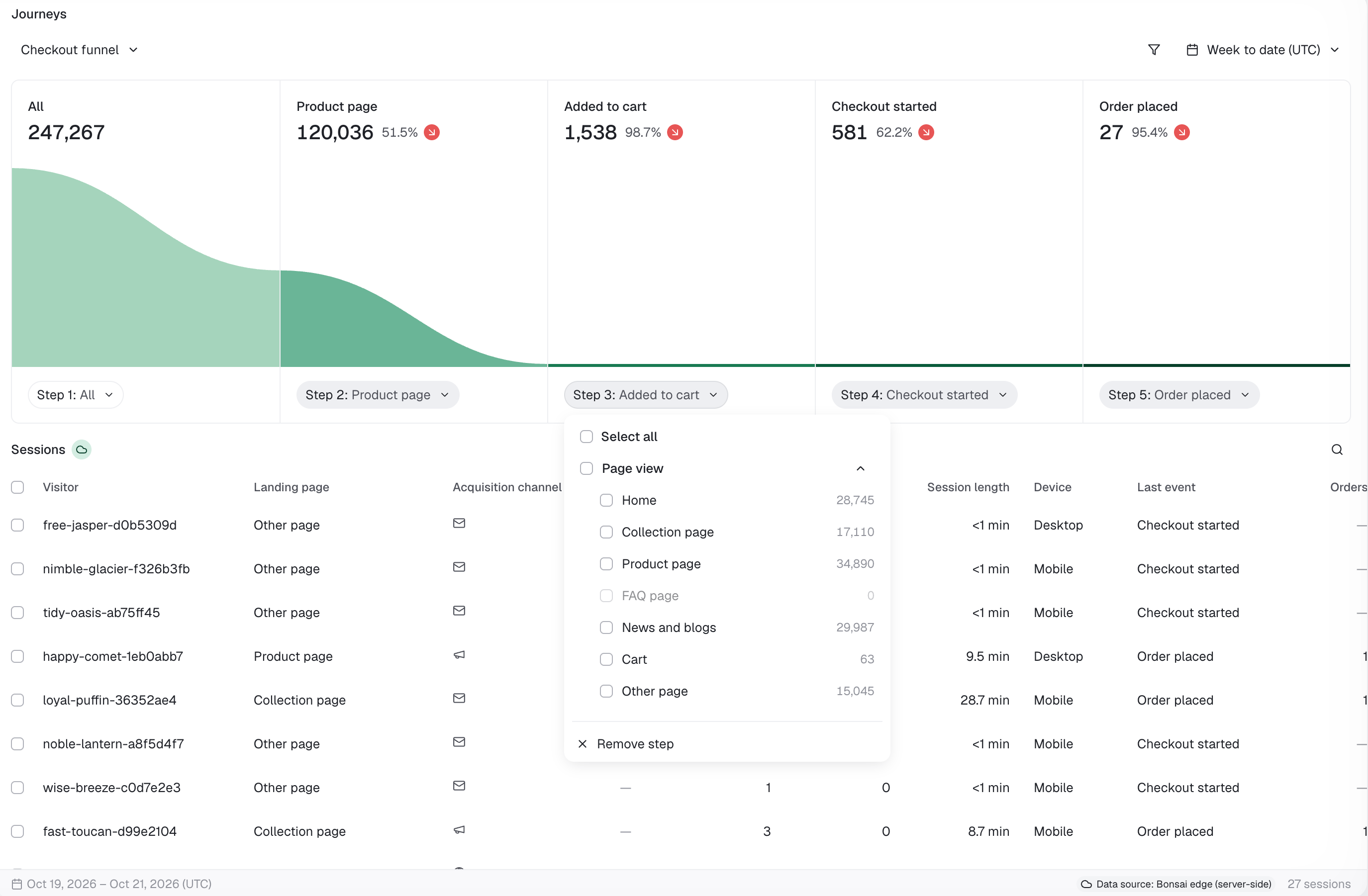
Read the funnel before changing it
Before the cart
If sessions reach product pages but do not add to cart, investigate product relevance, product information, and the path to purchase.
After checkout starts
If sessions begin checkout but do not place an order, inspect the experience and audience before deciding what to test.
How to use Journeys
Start with a question about your shoppers, then build a funnel that helps you decide what to investigate.Find where mobile shoppers drop off
Set up: Choose Checkout funnel and filter Device = Mobile. Compare with Desktop using the same dates and audience.Look for: The step with the largest difference in progression, alongside the number of sessions involved.Take action: Review the mobile experience at that step and choose a focused checkout or product-page test.
Evaluate a paid campaign's landing page
Set up: Filter Acquisition channel = Paid social and select your campaign dates. Build URL contains your landing-page path → Product page → Added to cart → Order placed.Look for: Whether visitors stop before discovering a product or after viewing one.Take action: Review how well the ad, landing page, and product selection work together.
Understand visits from AI assistants
Set up: Filter Acquisition channel = AI assistants and New vs returning = New. Build Product page → Added to cart → Checkout started → Order placed.Look for: Where these sessions stop progressing toward checkout. Narrow to a specific assistant where available.Take action: Review the product information and purchase path. Use Identity Mesh to explore connected return visits.
Customize the journey
1
Choose a preset
Start with Checkout funnel, Checkout abandoned, Search conversion, or Concierge conversion.
2
Set the audience
Apply a date range and the filters below. Keep the period consistent when comparing audiences.
3
Choose the steps
Build a sequence of up to six steps. Use a URL-contains condition to focus on a particular landing page or collection.
4
Inspect the result
Review progression and drop-off, then inspect the completed sessions listed below the funnel. Open a visitor panel for more context or select rows to export.
Available filters
Use filters to choose which sessions enter your funnel. Keep dates and other filters consistent when comparing audiences.Available steps to customize
Choose up to six steps in the order you want shoppers to follow. Use a page type for a broad journey or URL contains to focus on a specific landing page or collection.Saved journeys stay in your browser. Save a name to reuse a funnel on this store. Saved journeys are not shared with teammates or across devices.
FAQs
Event order and drop-off
Event order and drop-off
A session reaches a step when a qualifying event occurs after the previous step. If a step offers several options, any one qualifies. Consecutive repeated events count once.Drop-off counts sessions that reached the preceding step but did not reach the next. The table below the funnel lists sessions that completed the selected journey.
Why a funnel can differ from an attributed-order report
Why a funnel can differ from an attributed-order report
Journeys evaluates progression within a session. An order in a later session does not complete an earlier session’s funnel, even if an attribution rule credits an earlier interaction.For example, a Monday conversation followed by a Thursday purchase may qualify for Concierge credit. The Monday session still has no Order placed event.
Identity Mesh
Explore connected visits and customer identities where available.
Analytics
Review the wider patterns in Sales, Performance, and Behavior.